

Apple previews new child safety features
Apple previews new child safety features
Apple is providing simple and intuitive tools, based on guidance from online safety and health experts, to help parents create safer, more enriching digital experiences for their kids
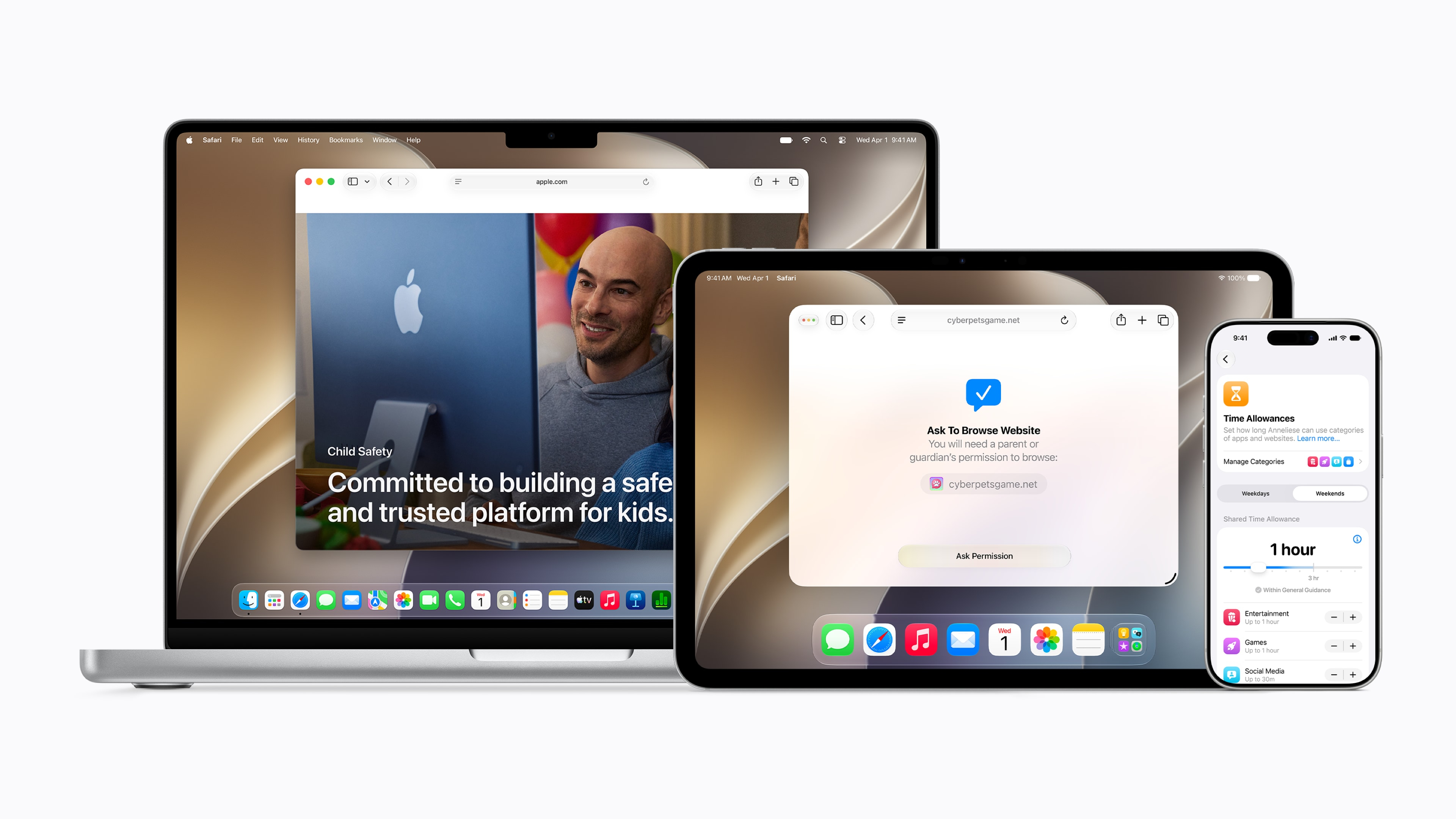
CUPERTINO, Calif.--(BUSINESS WIRE)--Apple® today previewed a new suite of powerful, intuitive, and easy-to-use features designed to allow parents to more easily manage the content their children can see, who they can communicate with, and when they have access to apps. With software updates this fall, parents will be able to access new child safety features, including a simpler setup experience with a recommended set of essential apps, Ask to Browse, Time Allowances, and a redesigned Screen Time. These updates enhance Apple’s already industry-leading parental controls and underscore its commitment to building a safe and trusted platform for kids.
“At Apple, our mission has always been to create technology that empowers people and enriches their lives, while helping keep them safe,” said Sumbul Desai, M.D., Apple’s vice president of Health and Fitness. “Our approach to helping families create safer digital experiences is grounded in the belief that every child is unique. That’s why we build simple and intuitive tools, based on expert guidance, to let parents tailor their kids’ digital journey. Today, we’re introducing major updates to help families thoughtfully establish age-based protections and develop healthy digital habits.”
Getting Kids Started with a Child Account
The first and most important step parents can take to create age-appropriate experiences for their child is to set up a child account. It enables safeguards across the system, tailored to the child’s age, like limiting adult websites, only allowing age-appropriate media, and setting age-based restrictions in the App Store®. Parents are guided through creating a child account when setting up a new device for their child. A child account is required for children under 131 and available for children up to 18.
What Content Kids Can See
Once a child account is created, parents can help their kids get a focused start by choosing exactly which apps they can access on their device. Parents have the option to start with just a few essential apps, a curated set, or choose just the apps they feel are appropriate for their child. Parents can then gradually add more apps over time, while staying in control at every step.
Parents have been able to easily expand access to additional apps over time with Ask to Buy, which enables parents to require that their child get their approval before downloading an app from the App Store — whether free or paid — or making an in-app purchase. With the new Ask to Browse, parents can also require that kids ask permission to access a new website in Safari®. This feature works seamlessly across iPhone®, iPad®, and Mac®.
Who Kids Can Communicate With
From the start, parents are able to manage who their children can connect with over Messages, FaceTime®, and Phone. As kids look to communicate with new contacts, parents can require their kids to ask for approval before connecting with anyone new.
Communication Safety already blurs nudity when detected in Messages and FaceTime calls, and is turned on by default for users under 18, and now it will also intervene to block gore or violent content when detected in shared images or videos.
When Kids Can Access Apps
Time Allowances give parents more flexible ways to manage the time their kids spend in apps across categories, including Entertainment, Games, and Social Media. When setting Time Allowances, parents are provided with guidance, based on expert research, that’s tailored to a child’s age. This serves as a helpful starting point for parents, who can easily adjust these settings based on what they determine is best for their child.
Parents can also set daily Schedules to manage which apps their children have access to at different times of the day and across the week. This helps parents ensure their kids can stay focused when it matters, like during school.
How Parents Can Guide Their Kids’ Digital Journey
Screen Time is now redesigned and gives parents an at-a-glance view of their kids’ average device usage and most used apps. Parents can easily make adjustments to their kids’ access to apps and the web in the moment, with just a tap. For example, to help protect important family moments, parents can quickly limit access during meals, outdoor play, and other times that deserve full attention. If kids need a little extra time to finish something in an app, parents can also easily extend access.
Empowering Families with Expert Guidance and Resources
For years, Apple has integrated guidance from leading clinical and child development research, as well as online safety experts, into its products and services, and continues to help advance research into children’s digital wellbeing. Apple is working with the American Academy of Pediatrics (AAP) to adapt its Family Media Plan into a guide parents can reference when using Apple products. Apple also continues to collaborate with researchers to understand the impact of technology on children’s wellbeing, and is committed to advancing the science in this area.
A Dedicated Website for Parents
To help parents stay informed and learn more, Apple has launched a dedicated website that features the latest tools, helpful resources, and answers to common questions — like how to get started.
Parents can also learn more online about existing trusted tools to help them protect their children, including:
- Screen Time Passcode Notifications alert parents when their Screen Time passcode has been entered on their child’s device.
- User Reporting Tools, available in certain countries and regions, report harmful content directly to Apple, and will be expanded globally.
- Apple Watch® For Your Kids brings the connectivity, fitness, health, and safety features of Apple Watch to children who do not have their own iPhone, so parents can have peace of mind while their kids gain more independence. Apple Watch For Your Kids makes it possible for parents to reach their child and identify their location via Find My®, while kids can also connect with family and friends through phone calls and messages, stay motivated to reach personalized Activity goals, express themselves through Memoji®, and enjoy features that give them more independence, like Apple Maps, Apple Music®, and Apple Cash®. Schooltime mode helps kids stay focused by blocking notifications and disabling apps.
Supporting Developers in Creating Age-Appropriate App Experiences
While Apple’s powerful controls help parents manage which apps their child can access and when, developers also play an important role in making sure kids are getting age-based experiences inside apps.
To help developers get started, Apple offers a suite of tools that can help protect kids from seeing inappropriate content like violence or nudity and help ensure parents approve any new in-app contacts, via SensitiveContentAnalysis and PermissionKit, respectively. Developers can also integrate the Declared Age Range API, which allows them to request a child’s age range and tailor their app experience accordingly. This is done in a privacy-protective way, without sharing a child’s birthday.
Availability
New features will be available after installing the Screen Time update in iOS 27, iPadOS® 27, and macOS® 27. Features are subject to change. For more information about availability, visit apple.com.
Apple revolutionized personal technology with the introduction of the Macintosh in 1984. Today, Apple leads the world in innovation with iPhone, iPad, Mac, AirPods, Apple Watch, and Apple Vision Pro. Apple’s six software platforms — iOS, iPadOS, macOS, watchOS, visionOS, and tvOS — provide seamless experiences across all Apple devices and empower people with breakthrough services including the App Store, Apple Music, Apple Pay, iCloud, and Apple TV. Apple’s more than 150,000 employees are dedicated to making the best products on earth and to leaving the world better than we found it.
Footnotes
1. The minimum age for account creation may vary across countries and regions. Learn more at support.apple.com/en-us/102617.
NOTE TO EDITORS: For additional information visit Apple Newsroom (www.apple.com/newsroom), or email Apple’s Media Helpline at media.help@apple.com.
© 2026 Apple Inc. All rights reserved. Apple, the Apple logo, App Store, Safari, iPhone, iPad, Mac, FaceTime, Apple Watch, Find My, Memoji, Apple Music, Apple Cash, iPadOS, and macOS are trademarks of Apple. iOS is a trademark or registered trademark of Cisco in the U.S. and other countries and is used under license. Other company and product names may be trademarks of their respective owners.
Contacts
Katie Lowry
Apple
k_lowry@apple.com