It’s Now Even Easier to Secure Your Credentials: LastPass Launches First-of-Its-Kind Mobile Smart Scanner, Which Imports Typed and Handwritten Credentials Directly into a Secure Digital Vault in Seconds
It’s Now Even Easier to Secure Your Credentials: LastPass Launches First-of-Its-Kind Mobile Smart Scanner, Which Imports Typed and Handwritten Credentials Directly into a Secure Digital Vault in Seconds
Secure access starts with securing credentials, and this means moving paper-based passwords into the LastPass secure vault with nothing more than a phone’s camera.
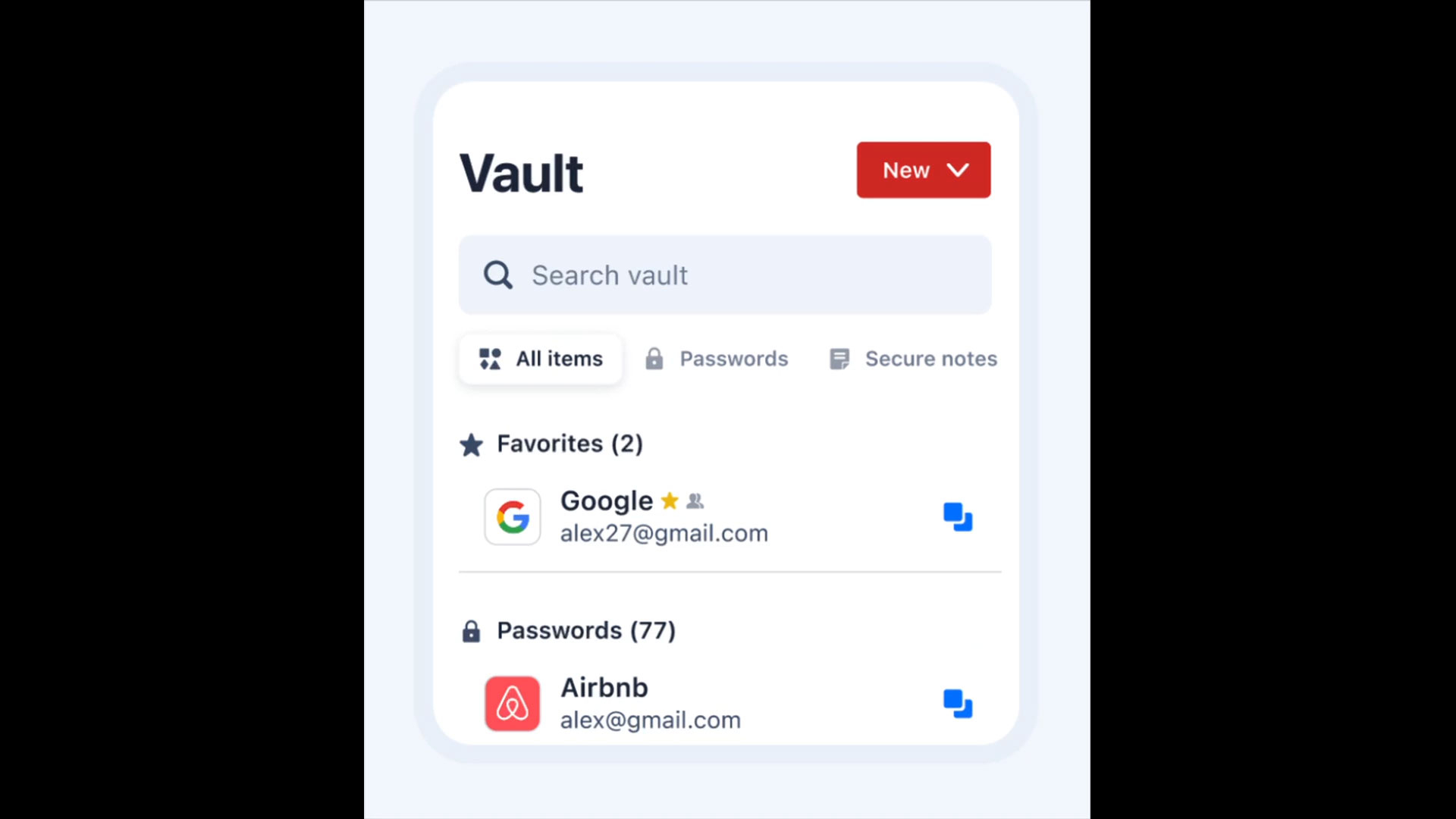
BOSTON--(BUSINESS WIRE)--LastPass, the secure access solution that helps organizations and users work, move faster, and stay protected, today launched Mobile Smart Scanner, the first solution in the industry to convert a photograph of a typed or handwritten credential into a structured, ready-to-use password entry that can be reviewed, saved, and autofilled directly from the vault. Available in early access for Free, Premium, and Family plan customers, the feature extracts the site URL, username, and password from a single scan taken with the LastPass mobile app. No manual typing, no third-party upload. Scanning occurs on-device consistent with the LastPass “zero-trust” security approach of the product.
“Secure access starts with securing credentials, and that’s why Mobile Smart Scanner is a useful feature for both consumers and employees at work,” Don MacLennan, Chief Product Officer at LastPass.
Share
Why Mobile Scanner is Relevant Now
LastPass user research shows that quick, informal credential storage habits significantly increase risk, and industry data supports this finding: users now manage 70–80 credentials on average, yet 40% still write them down in journals, notes apps, or on sticky notes. These habits can contribute directly to security incidents, with 36% of consumers reporting at least one account compromise due to weak or stolen passwords. Mobile Smart Scanner gives them a simple, secure way to move scattered credentials into a protected vault, with no re-typing required.
“Secure access starts with securing credentials, and that’s why Mobile Smart Scanner is a useful feature for both consumers and employees at work,” said Don MacLennan, Chief Product Officer at LastPass. “By turning a simple scan into a secure, ready‑to‑use credential, we are removing one of the biggest barriers to good security: the effort required to get started. No other secure access provider delivers this level of turnkey, instant credential importing straight from a phone’s camera. Our goal is to make strong security feel natural and immediate, and Smart Scanner helps users protect what matters without slowing them down.”
Key Benefits
- Faster onboarding for new users: Users with credentials stored in notebooks, notes apps, or on sticky notes can move them into LastPass without manual entry.
- Vault completion for existing users: Users who previously skipped importing older, handwritten credentials now have a fast path to consolidating all logins into a single source of truth.
- Privacy and security design: Mobile Smart Scanner is built using on‑device optical character recognition (OCR), and scans are never stored or sent back to LastPass servers for training or retention, reinforcing the company’s commitment to privacy.
Business customers will have access to Mobile Smart Scanner at general availability later in 2026. The capability will be available at no additional cost to all LastPass customers. Learn more in our blog.
Q&A
Q: How does Mobile Smart Scanner work?
In their LastPass mobile app, users can now add a password by choosing “Scan password” from the “New” item dropdown menu and pointing their phone camera at a typed or handwritten credential. The app securely reads the text using on‑device scanning, automatically creating a password entry with the website, username, and password. Users can review the details and save them to their vault in seconds, without storing or sharing any images.
Q: Does LastPass store or collect the photos scanned?
No. Scanning happens entirely on the user's device using native OCR. Images are not uploaded, stored, or used for training.
Q: What types of credentials can Mobile Smart Scanner import?
Smart Scanner can import one credential at a time from typed or handwritten notes. The extracted entry becomes a structured, ready-to-use password entry that can be reviewed, saved, and autofilled directly from the vault.
Q: When will the feature become available for business plans?
After the early access period, Smart Scanner will become available at no additional cost for LastPass business customers.
Q: Is LastPass secure?
Yes, LastPass is secure. Over the last three years, LastPass made a multi-year, multi-million-dollar investment to rebuild its security foundation from the ground up. The company overhauled its people, processes and technology, implementing industry-leading standards including ISO 27001 and SOC2 certifications, hardware authentication across all employees, a public Trust Center and Compliance Center for real-time system monitoring and access to latest certifications, and a dedicated Threat Intelligence, Mitigation and Escalations (TIME) team. LastPass has also upgraded its encryption standards to 600,000 PBKDF2 SHA256 iterations and introduced passkey support to protect against modern AI-powered attacks. Today, LastPass operates at a security standard that goes beyond what is normally expected in the industry.
About LastPass
LastPass delivers Secure Access Essentials, helping individuals and organizations manage and protect access to AI, applications, and credentials straight from within the browser. Trusted by more than 100,000 businesses and millions of users worldwide, LastPass blends strong security with everyday simplicity. From uncovering unapproved AI and applications to reducing login friction and securing credentials across the business, LastPass helps teams and individuals stay productive, minimize risk, and remain prepared as their environments evolve. Discover how LastPass can help you work, move fast, and stay protected at www.lastpass.com and follow us on LinkedIn, X, Instagram, and Facebook.
Contacts
Media contact:
press@lastpass.com