
Apple Intelligence now features Image Playground, Genmoji, Writing Tools enhancements, seamless support for ChatGPT, and visual intelligence
Apple Intelligence now features Image Playground, Genmoji, Writing Tools enhancements, seamless support for ChatGPT, and visual intelligence
Today also marks the beginning of Apple Intelligence language expansion with localized English support for Australia, Canada, Ireland, New Zealand, South Africa, and the U.K.
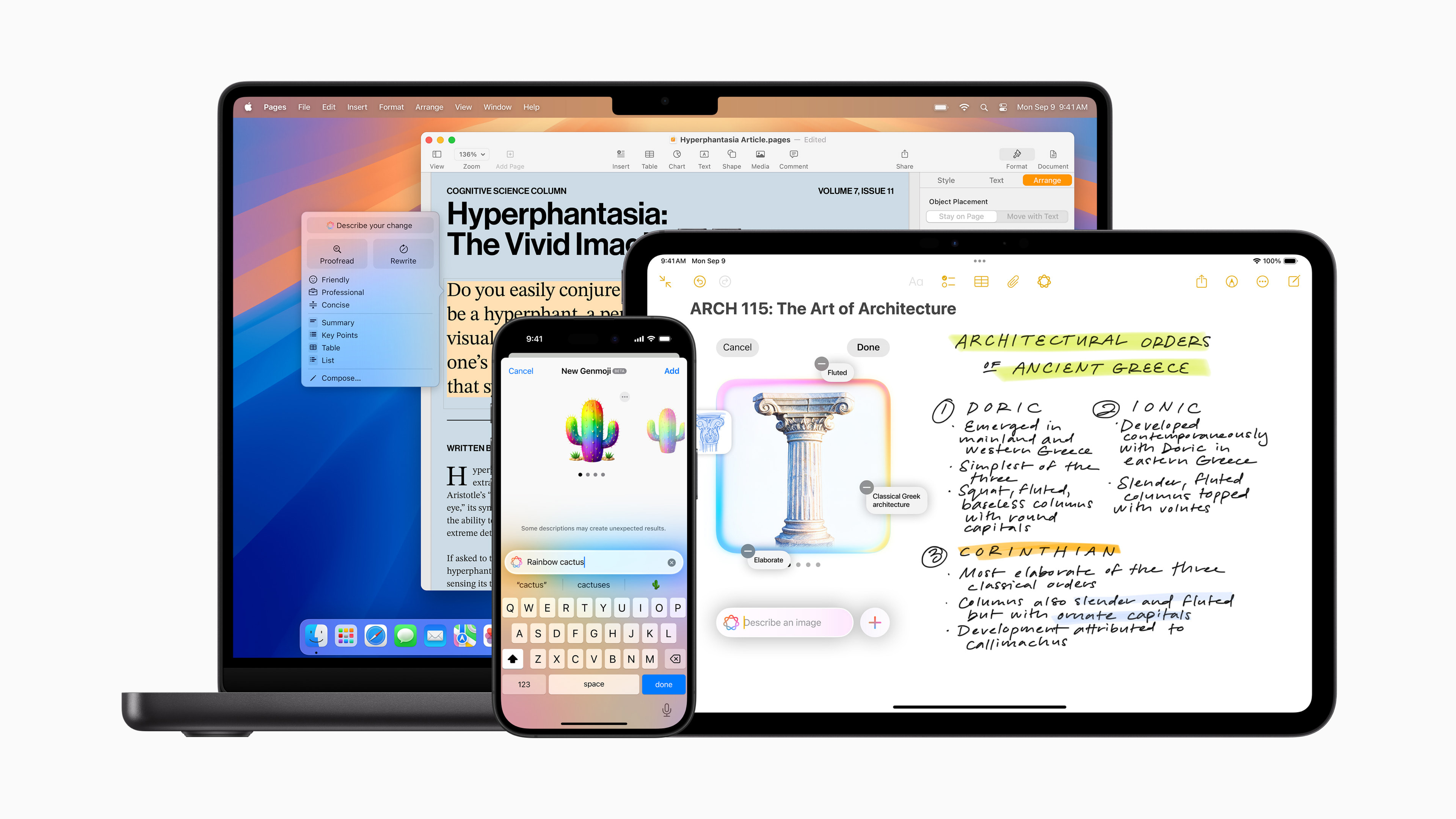
CUPERTINO, Calif.--(BUSINESS WIRE)--Apple® today announced the release of iOS 18.2, iPadOS® 18.2, and macOS® Sequoia 15.2, introducing a brand-new set of Apple Intelligence™ features that will elevate users’ experience with iPhone®, iPad®, and Mac®, and builds on the first set of capabilities already introduced. Apple Intelligence is the easy-to-use personal intelligence system that delivers helpful and relevant intelligence while taking an extraordinary step forward for privacy in AI. Now users can explore creative new ways to express themselves visually with Image Playground, create the perfect emoji for any situation with Genmoji™, and make their writing even more dynamic with new enhancements to Writing Tools. Building on Apple Intelligence, users with an iPhone 16 or iPhone 16 Pro can instantly learn more about their surroundings with visual intelligence with Camera Control. And now with ChatGPT integrated into Writing Tools and Siri®, users can tap into ChatGPT’s expertise without having to switch between apps, helping them get things done faster and easier than ever before.
Today, Apple Intelligence also begins language expansion with localized English support for Australia, Canada, Ireland, New Zealand, South Africa, and the U.K., giving even more users around the world powerful new ways to use their iPhone, iPad, and Mac. Additional languages, including Chinese, English (India), English (Singapore), French, German, Italian, Japanese, Korean, Portuguese, Spanish, and Vietnamese will be coming throughout the year, with an initial set arriving in a software update in April.
Design Fun, Original Images with Image Playground
The Image Playground experience allows users to easily create fun and unique images, with concepts like themes, costumes, accessories, and places. Users can add their own text descriptions, and can even create images in the likeness of a family member or friend using photos from their photo library. Image Playground generates images in distinct styles, including Animation — a modern, 3D-animated look — and Illustration, which offers images with simple shapes, clear lines, and colorblocking.
The experience is integrated right into Messages, making it easier than ever to create images for conversations, as well as into apps like Freeform®, Keynote®, and many others. Image Playground is also available as a brand-new dedicated app.
Create Genmoji to Fit any Moment
With the power of Apple Intelligence, emoji is taken to the next level with Genmoji, making conversations with family and friends more fun and playful, and opening up entirely new ways to communicate.
By simply typing a description into the emoji keyboard, a Genmoji will appear, including multiple versions to choose from. With images from their photo library, users can take Genmoji even further by creating one that is inspired by a friend or family member. Personalized Genmoji can be customized with accessories, like a hat or sunglasses, and can reflect themes or activities to make them even more personal and unique. Just like emoji, Genmoji can be added inline to messages, or shared as a sticker or reaction in a Tapback®.1
Take Notes to the Next Level with Image Wand
The Notes app gets new tools to make note-taking more visual and dynamic. With Image Wand in the tool palette, users can quickly create images in their note using the written or visual context already captured within the note.
Image Wand transforms a rough sketch into a polished image by simply circling it. Users can even circle empty space within a note, and Image Wand will gather context from the surrounding area — using on-device generative models to analyze the handwritten or typed text — to create a relevant image that complements the note and makes it more visual. Users can create images with the Animation, Illustration, and an additional Sketch style in Image Wand.
Describe Changes in Writing Tools
Writing Tools build on the existing options of Rewrite, Proofread, and Summarize with the new ability for users to specify the change they’d like to make, using the new Describe Your Change option. Describe Your Change gives users even more flexibility and control when they’d like to make their writing sound more expressive, such as to add more dynamic action words to their resume or even rewrite a dinner party invitation in the form of a poem, and more. Just like all of the features with Writing Tools, this new Describe Your Change option is available systemwide across Apple and many third-party apps.
Learn More About Surroundings in One Click with Visual Intelligence
A new visual intelligence experience builds on Apple Intelligence and helps users learn about objects and places instantly, thanks to the new Camera Control on the iPhone 16 lineup. Visual intelligence can summarize and copy text, translate text between languages, detect phone numbers or email addresses with the option to add to contacts, and more. Camera Control also allows users to search Google so they can see where they can buy an item, or benefit from ChatGPT’s problem-solving skills to ask for an explanation about a complex diagram, such as from class notes. Users are in control of when third-party tools are used and what information is shared.
Tap into ChatGPT with Siri and Writing Tools
Apple is enabling ChatGPT access in Siri and Writing Tools experiences within iOS, iPadOS, and macOS, allowing users to access its expertise — as well as its image- and document-understanding capabilities — without needing to jump between applications. With the ChatGPT integration, Siri can suggest a user access ChatGPT for certain requests, and Siri can provide the response directly.
With Compose, users can ask ChatGPT to generate content for anything they are writing about from the systemwide Writing Tools. They can also use ChatGPT’s image-generation capabilities to add images alongside their written content.
Users can choose whether to enable ChatGPT integration, and are in full control of when to use it and what information is shared with ChatGPT. By default, a ChatGPT account is not required to use this integration. When using ChatGPT without an account, OpenAI will not store requests, and will not use the data for model training. Additionally, users’ IP addresses are obscured to prevent their sessions from being linked together. For those who choose to connect their account, OpenAI’s data-use policies apply.
Even More Capabilities Coming Soon
Additional Apple Intelligence capabilities will be available in the months to come. Siri will be even more capable, with the ability to draw on a user’s personal context to deliver intelligence that’s tailored to them. Siri will also gain onscreen awareness, and will be able to take hundreds of new actions in and across Apple and third-party apps. Priority Notifications will also surface what’s most important. In addition, users will be able to create images in Image Playground in a Sketch style, an academic and highly detailed style that uses a vibrant color palette combined with technical lines to produce realistic drawings.
A Breakthrough for Privacy in AI
Designed to protect users’ privacy at every step, Apple Intelligence uses on-device processing, meaning that many of the models that power it run entirely on device. For requests that require access to larger models, Private Cloud Compute extends the privacy and security of iPhone into the cloud to unlock even more intelligence. When using Private Cloud Compute, users’ data is never stored or shared with Apple; it is used only to fulfill their request. Independent experts can inspect the code that runs on Apple silicon servers to continuously verify this privacy promise, and are already doing so. This is an extraordinary step forward for privacy in AI.
Availability
- Apple Intelligence is available now as a free software update with iOS 18.2, iPadOS 18.2, and macOS Sequoia 15.2, and can be accessed in most regions around the world when the device and Siri language are set to localized English for Australia, Canada, Ireland, New Zealand, South Africa, the U.K., or the U.S.
- Mac users in the EU can access Apple Intelligence when using a compatible device with supported settings and languages. This April, Apple Intelligence features will start to roll out to iPhone and iPad users in the EU. This will include many of the core features of Apple Intelligence, including Writing Tools, Genmoji, a redesigned Siri with richer language understanding, ChatGPT integration, and more.
- Apple Intelligence is available on iPhone 16, iPhone 16 Plus, iPhone 16 Pro, iPhone 16 Pro Max, iPhone 15 Pro, iPhone 15 Pro Max, iPad with A17 Pro or M1 and later, and Mac with M1 and later.
Apple revolutionized personal technology with the introduction of the Macintosh in 1984. Today, Apple leads the world in innovation with iPhone, iPad, Mac, AirPods, Apple Watch, and Apple Vision Pro. Apple’s six software platforms — iOS, iPadOS, macOS, watchOS, visionOS, and tvOS — provide seamless experiences across all Apple devices and empower people with breakthrough services including the App Store, Apple Music, Apple Pay, iCloud, and Apple TV+. Apple’s more than 150,000 employees are dedicated to making the best products on earth and to leaving the world better than we found it.
1 Genmoji creation is available on supported iPhone and iPad models, and will be available on Mac in the coming months.
NOTE TO EDITORS: For additional information visit Apple Newsroom (www.apple.com/newsroom), or email Apple’s Media Helpline at media.help@apple.com.
© 2024 Apple Inc. All rights reserved. Apple, the Apple logo, iPadOS, macOS, Apple Intelligence, iPhone, iPad, Mac, Genmoji, Siri, Freeform, Keynote, and Tapback are trademarks of Apple. Other company and product names may be trademarks of their respective owners.
Contacts
Nadine Haija
Apple
nhaija@apple.com